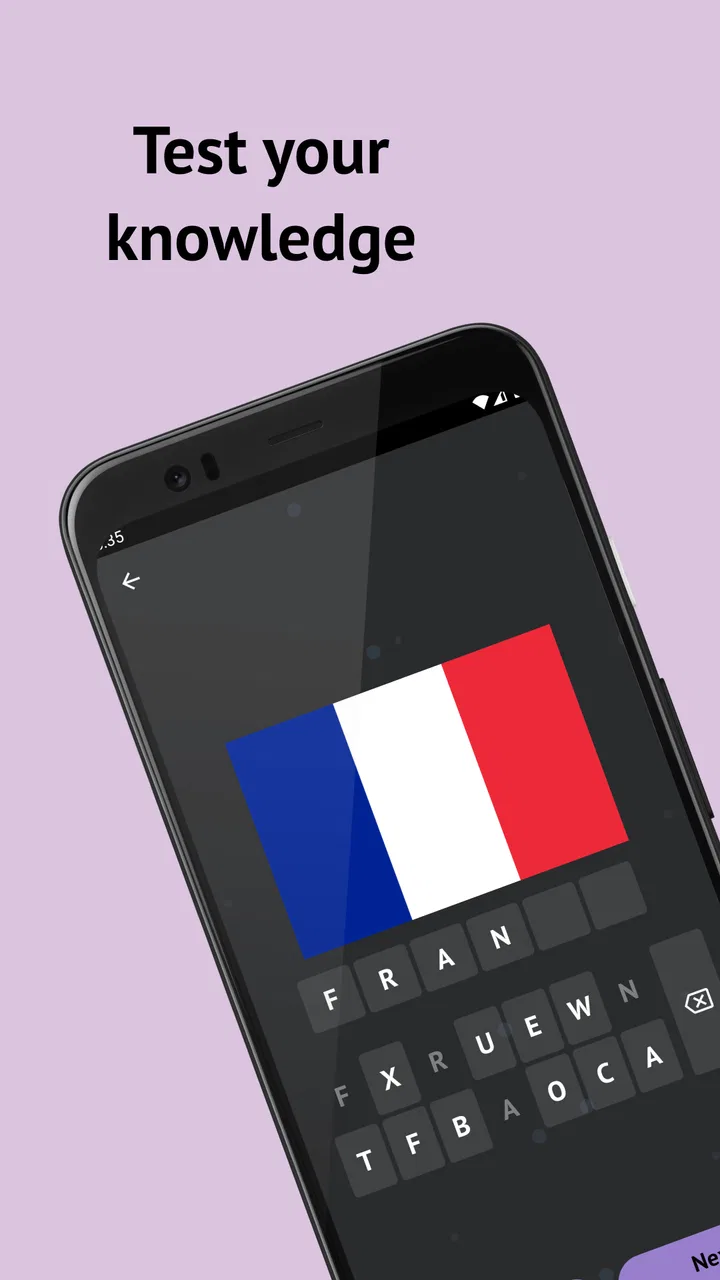
Country Flags: Geography Quiz
- 4.3
- Rating
- 500.00K
- Installs
- Free
- Price
 Analysis by App-foxy
I installed Country Flags: Geography Quiz expecting a quick way to test flag recognition, and that is exactly where it fits best: short trivia sessions that are easy to start and easy to stop. It is a free game in the trivia category from Cards, with a simple focus on identifying national flags rather than building a large feature-heavy experience around them. I found it especially suitable for a shared phone or tablet because one person can play for a few minutes, hand the device to someone else, and keep the activity moving without much explanation.
The appeal is immediate. A flag appears, I make a choice, and the result gives the next small challenge. That straightforward rhythm makes it approachable for someone who enjoys geography casually, while still offering enough uncertainty to expose the countries I routinely confuse. It is not a substitute for a full geography course, but it works well as a lightweight quiz for spare moments, family competition, or a quick mental warm-up.
A practical look at playing together at home
My favorite use case is a shared-device session after dinner. One person starts a round, answers a few flags, then passes the phone to another player. Because the game’s central idea is so easy to understand, nobody needs a long tutorial before joining in. A younger player can guess from visual details, while an adult may try to recall country names from travel, news, or school lessons. That difference in knowledge can make the same set of flags feel different for each person.
You May Also Like

 Blood Strike: 2.5 Anniversary
Blood Strike’s Loadouts Turn Every Drop Into a Tactical Gamble
A close look at Blood Strike’s custom loadouts: how fast access to signature weapons reshapes its battle royale rhythm, rewards preparation, and narrows the gap between fights.

 Pandora - Music & Podcasts
Pandora’s Music Is Easy to Start, but Harder to Recover
Pandora’s strength is its low-effort path from a seed to a station. Its weak spot is how much confidence it asks you to place in connection, setup, and quiet recovery.

 8 Ball Pool
 Is Built on Rivalries, Rematches, and Routine
A close look at the rivalries, rematches, shared routines, and unanswered safety questions that turn a quick pool match into a persistent mobile community.

 Samsung Music
’s Quiet Strength Is Playing What You Already Own
Its reach comes less from spectacle than from dependable access to a personal library. That simplicity is both the app’s strongest retention engine and its ceiling.

 AccuWeather: Weather Radar
AccuWeather Review: A Quick, Clear Forecast for Everyday Decisions
For everyday plans, the best forecast is the one you can understand quickly. AccuWeather makes rain timing, radar, and local conditions easy to act on, with a few trade-offs.

 Hill Climb Racing
Why Hill Climb Racing Still Turns Crashes Into One More Run
A tiny car, a bumpy hill and one more upgrade: Hill Climb Racing keeps resurfacing because its simple chaos makes every near-miss feel personal.
More From Our News Desk
View All News


This kind of play also avoids the pressure of a formal multiplayer setup. I would not approach it as a complete party-game platform with elaborate rooms, profiles, or coordinated matches. Instead, it works better as a turn-taking activity that people organize themselves. One useful house rule is to give each player the same number of turns and keep a handwritten score. That creates a fair comparison without assuming the game itself provides a shared scoreboard.
Another effective routine is to use it as a five-minute challenge before leaving the house. A parent can let a child answer first, then discuss why a flag looks familiar or which neighboring countries might be confused with it. The value is not only in getting the answer right. The conversation around colors, symbols, and regional similarities can turn a simple tap into a small learning moment.
The strongest household use is informal turn-taking, not synchronized competition. That distinction matters. If everyone wants live head-to-head play, messaging, team features, or a persistent family ranking, this game may feel too limited. If the goal is simply to make a waiting period or quiet evening more engaging, its narrow focus becomes an advantage.
What the first session feels like
The opening experience is deliberately uncomplicated. The store summary is “Guess The Flags!”, and the short description identifies the subject as “Country Flags.” Those phrases accurately set expectations without promising a broader collection of geography modes. I could begin thinking about the flags rather than learning a complicated interface, which is important when several people are sharing one device.
I recommend deciding in advance whether players should answer independently or discuss each question. Independent guesses make the activity more competitive. Group discussion makes it more educational, particularly when a child recognizes a color pattern but cannot remember the country. Neither approach requires an account arrangement or a formal family setup; the household can simply choose the style that suits the moment.
There is also a useful memory trick for repeated play: after an incorrect answer, say the country name aloud and connect it to one visual detail. For example, a distinctive emblem, unusual color combination, or arrangement of stripes can become the clue for the next encounter. This turns the quiz into a small review cycle instead of a sequence of disconnected guesses.
Keeping expectations clear on a shared device
Before handing the game to multiple people, I would establish whose turn it is and whether outside help is allowed. That sounds minor, but flag quizzes can quickly become arguments when one player searches for an answer or another player gives hints. Since this is a simple trivia experience rather than a dedicated household management tool, the boundaries have to come from the players.
I would also avoid treating a child’s score as a serious measure of geography ability. A person may know a country well but still miss a flag because several designs are visually similar. Conversely, someone with strong visual memory may score well without knowing much about the country itself. The game tests recognition first, so the result should be read as a snapshot of recall rather than a complete assessment.
On a family tablet, it is sensible to keep the game’s role separate from other personal activity on the device. Letting a child use it during a supervised session is different from handing over an unlocked phone for unrestricted browsing. The quiz itself is easy to understand, but the surrounding device context still belongs to the household’s normal rules.
Boundaries, age context, and everyday coordination
The content rating is Everyone, which matches the basic nature of the game: identifying flags does not require mature themes or specialized subject knowledge. I can see it working for children who are beginning to recognize countries, teenagers who enjoy quick quizzes, and adults who want to refresh familiar facts. Still, “Everyone” does not mean every player will find it equally easy. Younger children may need help reading country names or understanding why two flags look alike.
For a mixed-age household, I would use cooperative play first. Let the child make the initial guess, allow an older player to explain the clue, and then move on without making mistakes embarrassing. This keeps the emphasis on curiosity. Later, the same household can introduce timed turns or scoring if everyone enjoys the competitive side.
Trust and coordination are more important here than technical controls. I would not assume that the game manages separate household profiles, child accounts, or individual progress in a way designed for family use. The practical approach is to agree on how the device is shared and how turns are counted. If preserving separate personal histories is important, each player may prefer using their own device rather than treating one installation as a multi-user account.
That limitation is not necessarily a problem for casual use. A shared installation is convenient when the game is treated like a deck of quiz cards. It becomes less convenient when players expect detailed personal tracking, long-term progression, or a clear record of who answered what. In that situation, a more structured geography app or a traditional physical quiz set may be a better fit.
How I would organize a family session
I found that a simple three-stage routine keeps the activity from becoming repetitive. First, each player answers without help. Second, everyone discusses the flags that caused hesitation. Third, the group revisits the missed ones later rather than immediately repeating the same question until it is memorized. This approach makes the game a conversation starter and avoids turning every round into a test.
- Use equal turns instead of letting the fastest person control the device.
- Allow discussion when the goal is learning, but ban hints when the goal is competition.
- Say unfamiliar country names aloud so recognition includes pronunciation and memory.
- Keep a simple paper score if the household wants a shared result.
A particularly useful variation is the “explain the clue” rule. After an answer, the player must mention one feature they noticed, even if the guess was wrong. This reveals whether the player is using colors, symbols, layout, or a vague sense of familiarity. It also helps parents see what a child is actually learning instead of focusing only on the score.
Another trade-off appears when playing with people at very different levels. Giving everyone the same question is fair, but it may be frustrating for a beginner beside an experienced geography fan. I would solve that by making the experienced player describe the flag without naming the country, or by letting the beginner ask one yes-or-no question. These rules preserve participation without pretending that all players start with equal knowledge.
Device access and account expectations
The game is free to install, which lowers the barrier for trying it on a household device. It does include in-app purchases ranging from $0.99 to $99.99 per item, so I would review the purchase settings on a shared phone or tablet before allowing unsupervised use. The safest household habit is not to treat a free download as automatically free of purchase considerations.
This is especially relevant when a child borrows an adult’s device. The game’s age context is suitable for general audiences, but the payment context still belongs to the account holder. I would make the rule clear: playing is allowed, while purchases require permission. That boundary is simple, understandable, and more useful than assuming the child will recognize a transaction screen as something requiring an adult.
The current version is 3.0.0, and the minimum operating system is Android 5.0. That makes the game accessible to many older Android devices, which is helpful if a family keeps a spare phone or an older tablet for casual use. I would still check how comfortably the device handles the interface before planning a long group session, because an older screen or battery can be a bigger inconvenience than the quiz itself.
There is no reason to create an account arrangement solely for a short family challenge unless the game’s own installation flow asks for one. For a shared-device routine, the simplest method is usually best: open the game, agree on the rules, play, and close it when finished. For personal long-term use, however, I would consider whether the lack of clearly separated household identities affects how much value each player gets from returning to it.
Where it fits beside other geography options
Compared with a physical flag card deck, this game is quicker to start and easier to carry. A deck makes it obvious how many cards remain and supports custom house rules, while the app removes setup and storage. The physical option may be better for a classroom table or a group that wants to write notes directly on the material. The app is better when one device is already available and the group wants an immediate challenge.
Compared with a broad geography app, this title is more focused. A larger alternative might combine capitals, maps, borders, landmarks, and country facts. That breadth can create deeper learning, but it can also make a child feel lost or turn a short break into a lesson. Country Flags: Geography Quiz is more approachable when the specific aim is visual flag recognition.
Compared with online trivia platforms, it is less dependent on social coordination. Online services may offer live rooms, public rankings, or wider question categories, but they can also introduce distractions and a stronger competitive atmosphere. I prefer this game for a quiet household session where the device is passed around. I would choose an online alternative when the group is in different locations or wants real-time competition.
The trade-off is clear: focus makes the game welcoming, but it also limits variety. If you already know most national flags, the experience may become familiar sooner than a full geography curriculum would. In that case, using it as a warm-up before a more detailed map or country-facts activity is more sensible than expecting it to cover every aspect of geography.
Who should try it, and who should skip it
I would recommend it to casual learners, families wanting a low-pressure shared activity, and anyone who likes visual trivia. It is also a reasonable choice for a person who wants to identify weak spots in flag knowledge without committing to a complex study app. The short-session format makes it easy to fit between errands, during a break, or while waiting for another household activity to begin.
I would be more cautious about recommending it to someone seeking detailed explanations after every answer, structured lessons, personal progress analysis, or live multiplayer coordination. Those users may get more from a specialized educational app or a richer online quiz service. Likewise, a player who dislikes repetition or already has excellent flag recall may find the narrow subject less rewarding over time.
The download has reached over 500 thousand installs and holds a 4.3 average from around 1.5 thousand ratings, which suggests that the simple concept has attracted a substantial audience. I treat those figures as useful context rather than proof that it will suit every household. The real question is whether your group wants a focused flag quiz or a broader geography tool.
My household verdict
After using it as both a solo quiz and a shared-device activity, I see Country Flags: Geography Quiz as a friendly, limited-purpose game. Its best quality is that it gets out of the way: the subject is clear, the age context is broad, and a family can invent its own turn-taking system without learning a complicated platform. That makes it easy to recommend for casual use.
Its weaknesses come from the same simplicity. Players who need separate profiles, detailed learning paths, live coordination, or a wide range of geography topics should look elsewhere. Shared use also depends on household rules, particularly around scoring, hints, and in-app purchases. The game can support a family routine, but it does not replace the coordination that family members provide themselves.
For me, the best way to use it is as a compact visual quiz: play a few turns, discuss the confusing flags, and stop before the activity feels like homework. It is free to try, suitable for Everyone, and available from the developer Cards, with the release dated Jul 27, 2022. If your household wants a simple way to turn spare minutes into a geography conversation, I think it is worth installing. If you want a complete learning system or a true multiplayer experience, choose a broader alternative instead.
FAQs for Country Flags: Geography Quiz
01What is Country Flags: Geography Quiz?
Country Flags: Geography Quiz is an educational app designed to help users learn and identify the flags of different countries around the world. It offers various levels of difficulty and interactive quizzes to test and expand your geographical knowledge. The app is ideal for students, travelers, and trivia enthusiasts.
02How does the gameplay work in Country Flags: Geography Quiz?
The gameplay involves identifying flags from multiple-choice questions or matching flags with their respective countries. Progress through levels by correctly answering questions to unlock more challenging quizzes. The app features timed modes for added excitement and offers hints to assist you when you’re stuck.
03Is Country Flags: Geography Quiz suitable for all ages?
Yes, Country Flags: Geography Quiz is suitable for all ages. It provides an engaging and educational experience that can be enjoyed by children, teenagers, and adults alike. The app is designed to be user-friendly and educational, making geography fun and accessible for everyone.
04Does the app require an internet connection?
Country Flags: Geography Quiz can be played offline, allowing users to enjoy the game without needing a constant internet connection. However, certain features, such as leaderboards and updates, may require internet access to function fully. This makes the app convenient for use during travel or in areas with limited connectivity.
05Are there in-app purchases in Country Flags: Geography Quiz?
Yes, the app offers in-app purchases. These may include options to remove ads, purchase additional hints, or unlock premium content for a more enriched experience. While the basic version is free, these purchases can enhance gameplay, though they are not necessary to enjoy the core features of the app.
Pros
- Wide variety of flag quizzes available.
- Intuitive interface enhances learning.
- Offline mode for on-the-go play.
- Regular updates with more content.
- Educational and engaging for all ages.
Cons
- Limited hints can be frustrating.
- Repetitive ads can interrupt gameplay.
- No multiplayer mode available.
- Some flags lack detailed descriptions.
- Lacks customization for quiz settings.

Country Flags: Geography Quiz
Gallery